The Most Common JavaScript Errors and How to Fix Them
Errors do make sense after all

JavaScript Geek 😎 — Undergrad at UoM 🇱🇰 ❤️
Photo by Sarah Kilian on Unsplash
Errors can be one of the biggest headaches during the process of software development. What makes them bad is that they might sound alien when you read them for the first time. But when you take your time and read properly, they do give a summary of what you need to know.
Here is a list of common JavaScript errors and their relevant fixes. The fixes might not work exactly the same for you, as they differ from framework to framework, but they will give you an idea of why the error is occurring in the first place.
1. Uncaught TypeError: Cannot Read Property
This is one of the most common JS errors on the list. It occurs when you try to access a property or a method in an undefined object. Let's reproduce this error.
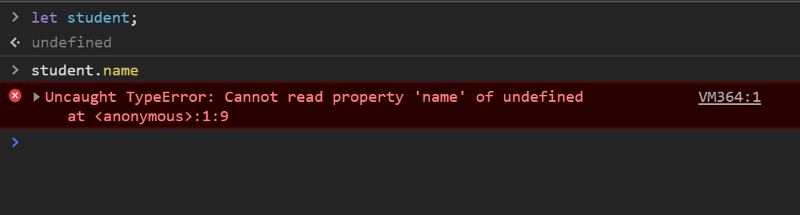 Reproduction of error
Fix
Assign a reasonable value to the object during construction or initialization — do not keep it null or undefined.
 Fix
Fix
2. TypeError: ‘undefined’ Is Not an Object
This is the same error as above. But the error above is output on Chrome while this error is output on Safari. The error occurs when you call a property or method on an undefined object.
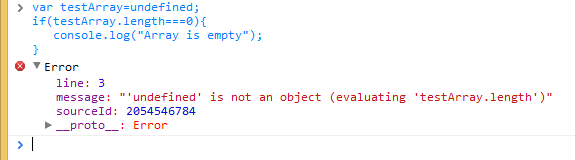 Source: Rollbar
Fix
Assign a reasonable value to the object during construction or initialization — do not keep it undefined.
3. TypeError: ‘null’ Is Not an Object
The error occurs when you call a property or method on a null **object. This is an error that, like the above, occurs only on Safari.
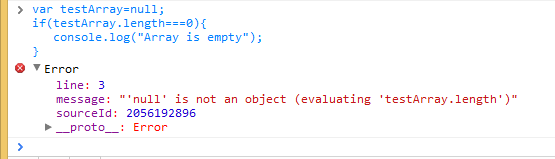 Source: Rollbar
Fix
Assign a reasonable value to the object during construction or initialization — do not keep it null.
The above errors can also occur when you try to access the DOM elements before they are loaded. Read these JavaScript tips to get a better idea of this issue.
Note
One thing you should note is that undefined and null are two different things in JavaScript. This is why we see variants of the error messages in both instances. undefined is usually the variable not being initialized, while null means the value is empty.
Read this blog post to further enhance your knowledge of JS null and undefined.
4. TypeError: Object Doesn’t Support Property
This is an error that occurs on IE when you call an undefined method.
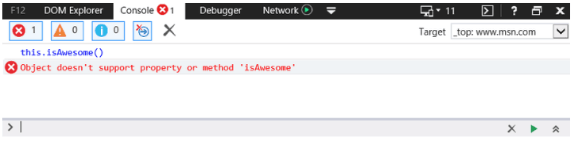 Source: LambdaTest
This is very much equivalent to the error “TypeError: ‘undefined’ is not a function” in Chrome.
You will have understood by now that different browsers have different errors for the same logical problem.
Fix
This error is a common problem for IE, as Jason Skowronski of Rollbar says. He further states that this is a common problem on IE where JS applications employ namespace binding.
When this is the case, the problem 99.9% of the time is Internet Explorer’s inability to bind methods within the current namespace to the this keyword — for example, if you have a JavaScript namespace with the method isAwesome. Usually, if you are within the namespace, you can invoke the isAwesome method with the following syntax:
this.isAwesome();
Chrome, Firefox, and Opera will accept this syntax without any issues. Internet Explorer, on the other hand, will not. Thus, the safest bet when using JavaScript namespacing is to always prefix with the actual namespace.
NameSpace.isAwesome();
5. TypeError: ‘this.show’ Is Not a Function
This error occurs when you call an undefined function. This error message can be obtained in Chrome and Firefox.

Fix
This error can result simply because you have forgotten to define your function or you have a typo. This is the simplest case.
But you can have a more complex case as well. This occurs due to self-referencing scopes within callbacks and closures. Let’s replicate this error by using the example given by Jason.
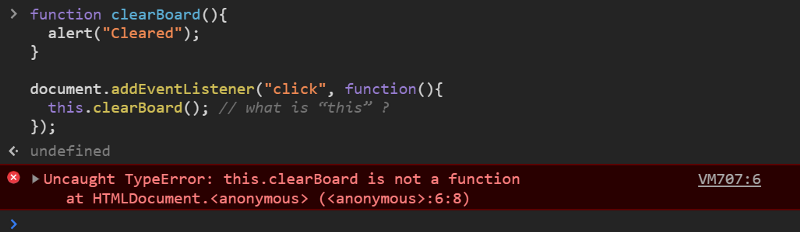
When we execute the above code snippet and click on the page, we get the error. This is because the function clearBoard is defined in the window, and the anonymous function is executed in the context of the document.
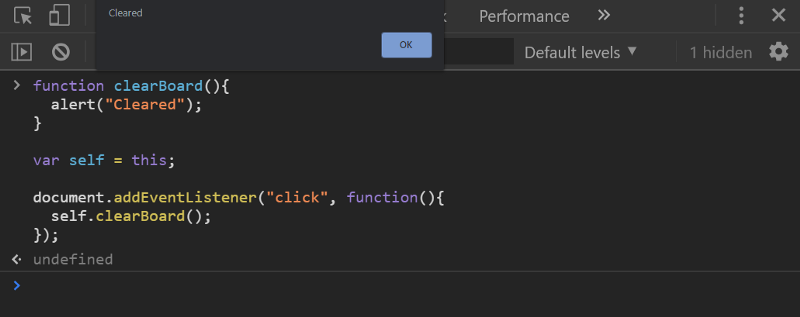
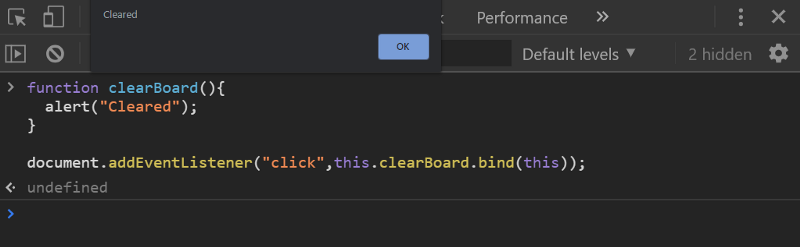
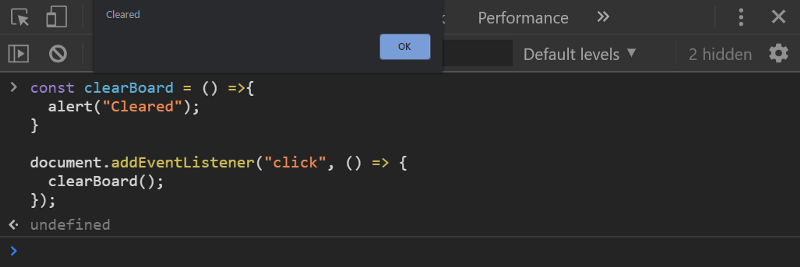
There are three ways to fix this error.
Traditional approach — This is an old browser-compliant solution. We simply save the reference to this to a variable and later refer to it inside the closure.
Modern approach using bind — This is a more modern approach that uses the bind method to pass the respective reference.
Modern approach using arrow functions — This is also a modern approach. It uses ES6 arrow functions.
6. Uncaught RangeError
This error occurs on Chrome mainly due to two scenarios.
Your recursive function does not terminate
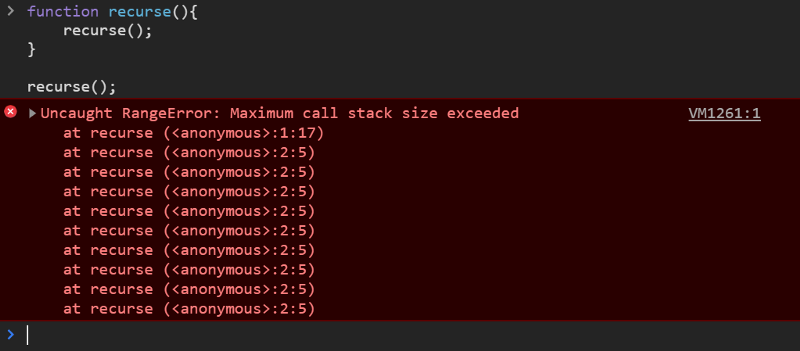
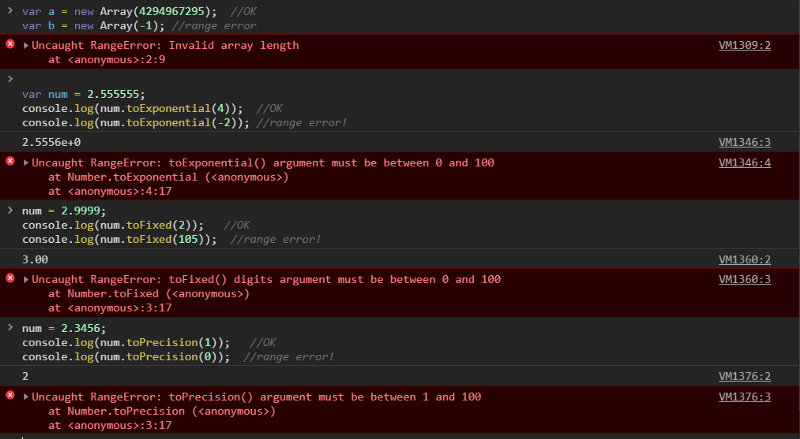
You pass a value that is out of range to a function
Let’s use the example given by Jason. Many functions only take values within a certain range as input values. Number.toExponential(digits) and Number.toFixed(digits), for example, allow digits from 0 to 100, but Number.toPrecision(digits) accepts digits from 1 to 100.
Conclusion
Most of these errors occur because of null/undefined and scope/closure issues. As you are now aware of the most common JS errors and how to tackle them, I strongly suggest you read the references below to gain better insight into errors. And I would like to suggest that you use an error logger like Sentry to help log errors in production. This will enable you to discover unknown bugs.
I hope you learned the root cause of most JS errors. Happy coding!